Boards & tickets
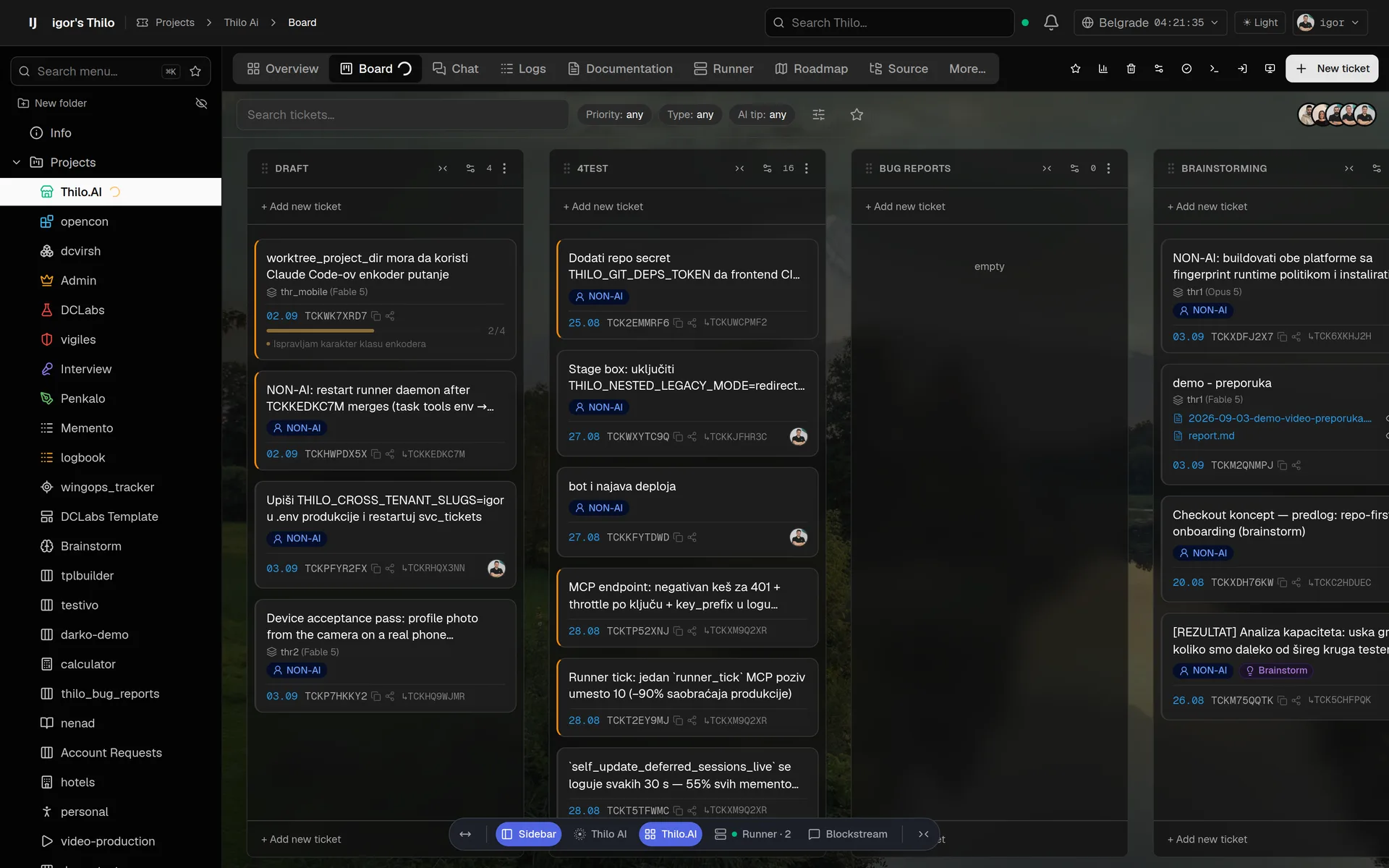
Kanban boards with drafts, queue, work and review. Every ticket is a living document: rich description, files, comments, activity stream and a full history in which nothing is ever deleted.
Thilo-AI is a project workspace for software teams: kanban boards, tickets, chat, calendar and meetings, timesheets — plus AI runners that claim your tickets, write the code in an isolated branch, verify it in a real browser and come back with a report for review.
What is thilo.ai
Everything a software team runs on — boards, tickets and tasks, documents and notes, chat, calendar, meetings and booking pages, time — with AI runners as first-class teammates that actually pick up the work.
Kanban boards with drafts, queue, work and review. Every ticket is a living document: rich description, files, comments, activity stream and a full history in which nothing is ever deleted.
Connect a runner to your repository. Queued tickets get claimed automatically: the AI plans, codes, tests and returns the ticket with a report and deliverables.
Each project maps to a git repository. Work happens on isolated branches in separate checkouts, and nothing lands on the trunk before a human approves it.
Browse the worktree's code and tests from the project, run one test from the code view, and search file names and symbols across the checkout — read from your own machine through the runner, never stored on ours.
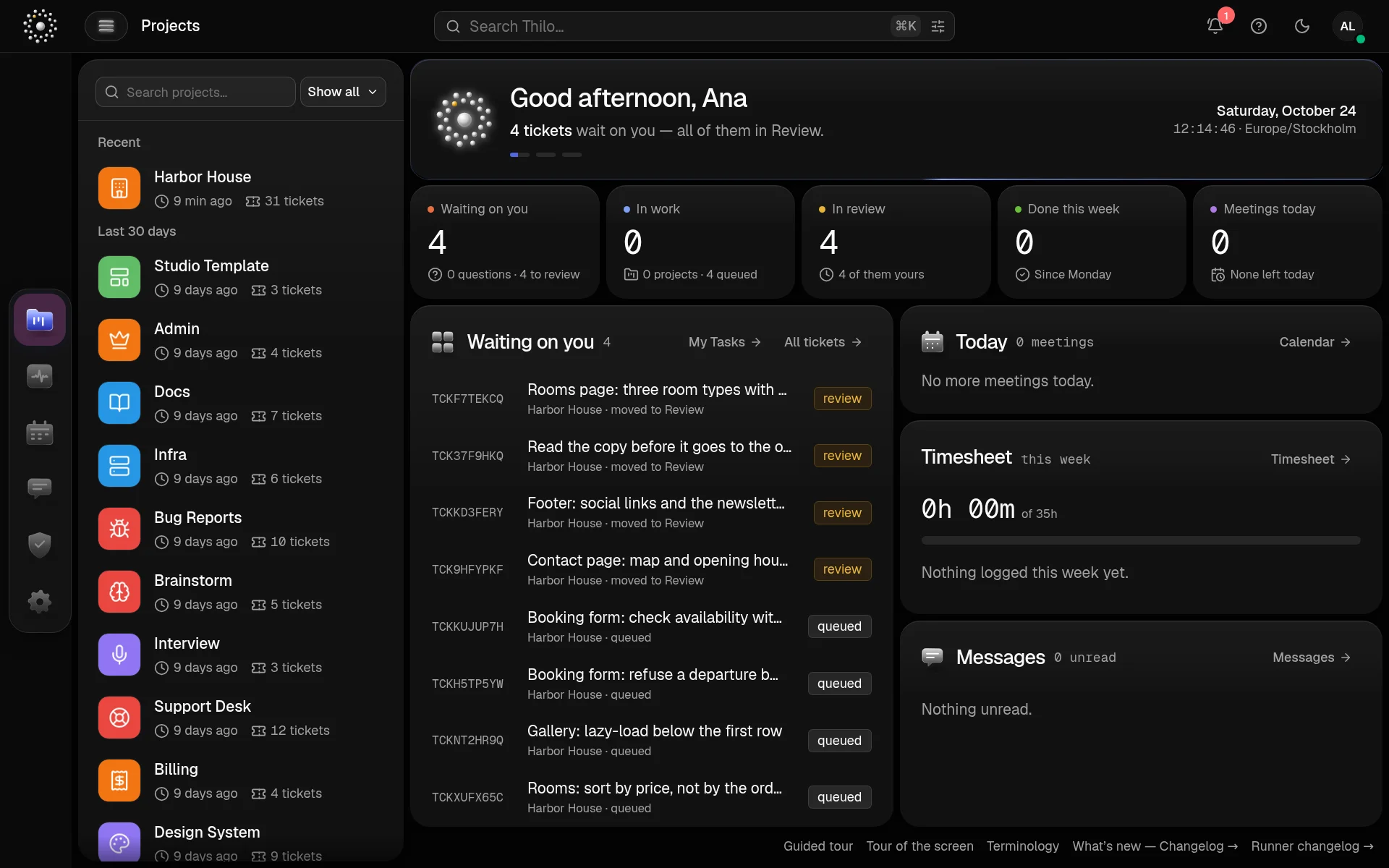
Work for a person, not for the AI. One Tasks page gathers every task from every project you can see — and from your other workspaces in the same account — as a table or a kanban with columns of your own. Tick one off and it moves to Done.
Message a colleague or a group from the project's Users pane, with unread counts where you look. Or talk to the AI on a project or worktree, write the spec together and turn the conclusions into tickets without leaving the thread.
A calendar for the whole Workspace, and audio and video meetings in Thilo-AI's own room — a guest link, screen sharing, recording. Call a colleague straight from their row, and the time is logged for everyone who was there.
Transcripts & search — coming soonPublish your free hours as a link. A guest with no account picks a slot on their phone, in their own time zone, and the booking lands on your calendar as a meeting with a room link — confirmed at once, or waiting for your approval.
Send a client, a candidate or a group of users a questionnaire on a link of its own, in their language, with no account needed. Every answer comes back to the project as a ticket, with its English beside it, ready to analyse.
Timesheets and clock-out, which spreads your day over the tickets you worked — and a meeting logs its time for everyone who was in the room. Live progress reports and per-project costs: who (or what) did what, and how long it really took.
A notebook for the workspace's owner, on the web and on the phone, locked with a six-digit PIN — or your face or finger on the phone. Every title, body and folder name is encrypted in the database, and the key is opened only while you have it unlocked.
Every team gets its own workspace on its own subdomain, with role-based access and isolated data. Light and dark mode included, naturally.
How it works
You drive and you decide: describe what you want, judge the result — and when the runner needs you, options and follow-up questions arrive in the ticket's chat. The steps in between still belong to the runner.
Describe the change in plain language — attach screenshots, paste logs, link other tickets. Or let the AI draft it from a chat.
Drag the ticket to the queue. A connected runner claims it within seconds and moves it to work — visibly, on the board.
It codes on an isolated branch, runs the tests, checks the UI in a real browser and records the proof — keeping a task list you can watch live. Needs a decision? It asks you in the chat and waits.
The ticket comes back with a report, the diff and the deliverables. Approve it and the branch merges — or send it back with a comment.
One ticket, the way the runner logs it. The same lines land on the ticket itself, next to the diff and the report, so the work is readable long after it is done.
Try it
A board that behaves, running in this page: write a change, drag it to the queue, and a runner claims it, works through its task list and hands it back for review — where you approve it or send it back. No account, no sign-up, and nothing leaves your browser.
The runner in the frame is a timer, not our AI, and the report it writes is scripted. Everything around it — the board, the columns, the card, the live task list — is the product.
Screens
These are live screenshots from a working thilo.ai workspace — the same screens your team gets on day one, in light and dark.
The kanban board: humans and AI runners moving the same tickets, with live progress on every card.
Thilo Vault · premium
Thilo Vault is a premium option, included in every paid plan. A project you put in a vault lives entirely on hardware you own — your machine or your server: its tickets, comments, documents, attachments and the repository the runner works in. We keep the login, the billing and the routing — the content never reaches our database, and nobody here can read your code or your documentation.
Tickets, descriptions, comments, files and the full history are stored in the vault's own database, on your machine, next to your repository. The AI runner works there too. None of it is kept at rest on our side.
We cannot open your tickets, read your documents or look at your code — not from support, not from a backup, not from a log line. What the platform holds about a vault project is an identifier and a health status, never content.
The machine dials out to us over a single encrypted connection on port 443, and answers over it. No inbound port, no public IP, no certificate to manage — and no VPN for your team.
A runner and a vault both install with a single command the app hands you. These are the real ones: what is highlighted is filled in for your project, and you copy the finished command out of the app.
Any laptop, VM or on-prem box that can reach the internet. It dials out to us and asks for work — no inbound port, no public IP, and no SSH from our side, ever.
curl -fsSL https://<workspace>.thilo-ai.com/api/tickets/runner-install/<board-id>/<token> | bashNeeds git, tmux, curl and a signed-in Claude Code CLI. Linux and macOS today; Windows is coming.
Your project's data stays on hardware you own. The install link is single-use and expires in fifteen minutes, and the database password is generated on your machine and never leaves it.
curl -fsSL https://<workspace>.thilo-ai.com/api/tickets/vault-install/<vault-id>/<token> | bashNeeds podman 4 or newer, a compose front end, x86_64 or arm64 and 15 GiB free. Linux and macOS.
Who it is for
If your work lives in a repository and dies in a backlog, thilo.ai is for you.
Mobile app
The thilo mobile app pairs with your workspace by scanning a QR code — no typing, no setup.
Get the app The iOS and Android builds are in beta — sign in and they are yours.
The board in any browser, the app in your pocket, the runner and the vault on machines you own. What runs where, and what does not yet.
| Component | Browser | macOS | Linux | iOS | Android | Windows |
|---|---|---|---|---|---|---|
| Web app boards, tickets, chat, calendar, meetings, timesheets | ✓Yes | ✓Yes | ✓Yes | ✓Yes | ✓Yes | ✓Yes |
| Mobile app notifications, board, tickets | —No | —No | —No | ~Partly1 | ~Partly2 | —No |
| Runner works your tickets | —No | ✓Yes | ✓Yes | —No | —No | —No3 |
| Thilo Vault your data, your hardware | —No | ✓Yes4 | ✓Yes4 | —No | —No | —No |
✓ available ~ with a limitation — not on this platform
Videos
Five films are up: a short one on what Thilo-AI is, a data-analysis chain that turns one photo of the Voyager Golden Record into a website, a company's whole website rebuilt from the old one, a research ticket from question to report, and an engineering problem solved in six iterations on a board. The walkthroughs are being recorded, and this is what they will cover.
A ninety-second film on what thilo.ai is: a client sends three photos, a ticket is written, and an AI runner builds the page, checks its own work and hands it back for review.
An eight-minute use case. A single photo of the Voyager Golden Record starts the chain: a runner catalogs what is inscribed on it, finds where both spacecraft are today, and licenses the pictures — then builds a five-page website from the results, and answers a client's change request by email.
A sixteen-minute use case: a company's ageing website rebuilt with Thilo-AI. The old pages go in as they stand, the new structure is agreed on a board, and the runners write it, check their own work in a browser and hand the new site back page by page.
A three-minute use case. A ticket does not have to be about code: one research question on a small airline's board, and a runner hands back a memo with charts and every number next to its source.
A four-minute use case. An engineer brings a real design problem to a board — the inner head of a gas burner, not a line of code — writes five tickets, answers the questions the AI opens as tickets of its own, and learns the problem was never in the head: it was in the fan.
Your workspace, your first board and your first ticket — the first ten minutes in thilo.ai.
Connecting a runner to your repository and watching it take a ticket from queue to review.
The long demo: several projects running in parallel, from brainstorming in chat to reviewing and merging what the AI built.
Sign in by scanning a QR code, then follow every board, write tickets and answer a runner from your phone.
Putting a board on your own machine: the same product, the same screens — and code and content we cannot read.
Brainstorming with the AI on a project or a worktree, agreeing the plan, and turning it into tickets without leaving the thread.
What a runner hands back — the report, the diff, the browser check — and how a human takes it from review to done.
Timesheets, clock-out and the live report: what was done, by whom or by what, and what it cost per project.
Pricing
Start on the free plan and stay there as long as you like — it is the whole product, not a trial. Paid plans add Thilo Vault, more people and more projects; nothing else about the way you work changes.
$0
One person, one project, one runner — on our platform.
Use it free$49 / month$490 / year
One person with clients: your own vault, ten client seats, runners without a limit.
Start free$195 / month$1,950 / year
A team that ships: ten editors included, and seats added one at a time as you grow.
Talk to uson contract
SSO, a contract and an SLA — and as many workspaces as your agency runs.
Call usAI runs on your hardware with your own Claude account — tokens are never part of our bill.
Swipe the table sideways to compare every plan.
| Feature | Free | Solo | Team | Enterprise |
|---|---|---|---|---|
| Thilo Vault — data on your own server | Not included | Included | Included | Included |
| Editors (team members) | 1 | 1 | 10 included, then per seat | Unlimited |
| Client seats — accounts for your clients, per board | Not included | 10 | 50 included, then per pack | Unlimited |
| Projects | 1 | 10 | 50 included, then per pack | Unlimited |
| Worktrees in progress at once | 1 | Unlimited | Unlimited | Unlimited |
| Runners | 1, on your server or laptop | Unlimited | Unlimited | Unlimited |
| Tickets, blockstream history | Unlimited | Unlimited | Unlimited | Unlimited |
| Mobile app, timesheets, chat, calendar, meetings | Included | Included | Included | Included |
| Support | Community, e-mail | Priority e-mail | SLA, a named contact | |
| SSO / SAML, contract and invoice, several workspaces | Not included | Not included | Not included | Included |
Every plan starts on our platform. Thilo Vault moves a project's data — its tickets, documents, attachments and the repository — onto a server you own, where we cannot read it. It is a premium option, included in every paid plan, from Solo up.
A client seat sees only the boards you add it to: it can read and comment, but it cannot create projects or start runners.
Contact
Questions, a demo, a partnership — write to us and a human answers. Usually the same day.
Request an account, get your own workspace, and give your first ticket to a runner.